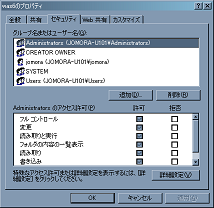
NTFSでは、フォルダやファイルに対して、Windowsグループまたはユーザ毎に詳細なアクセス権限を設定することができます。通常は、フォルダのプロパティのセキュリティタブで設定しますが、.NETプログラムから設定する方法を調査してみました。
他にもやり方はあるでしょうが、David Hall氏のNT Security Classes for .NETを利用するのが簡単で多機能だと思います。他にもいろいろ機能があって、このライブラリは大変重宝しますね。
NT Security Classes for .NET(mmsseclib.dll)のコンパイル
まず、The Code ProjectのWebサイトからソースファイルをDownloadし、DLLを作成する必要があります。VC++のコンパイラを用意してください。
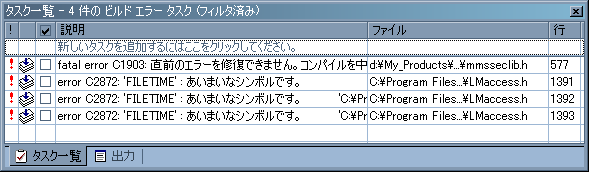
公開されているソースをVisualStudio.NET2003でビルドすると、以下のようなエラーになります。
どうもヘッダファイルのinclude順序に問題があるようです。これを修正するには、mmsseclib.hファイルの
using namespace System;
using namespace System::Collections;
using namespace System::ComponentModel;
using namespace System::Runtime::InteropServices;
using namespace System::Security::Principal;
using namespace Win32;

#include "enums.h"
#include "mgdhelp.h"
#include <lm.h>
という記述順序を
using namespace System;
using namespace System::Collections;
using namespace System::ComponentModel;
using namespace System::Security::Principal;
using namespace Win32;

#include <lm.h>
#include "enums.h"
#include "mgdhelp.h"

using namespace System::Runtime::InteropServices;
に変更してビルドすると成功するはずです。
NT Security Classes for .NETの利用法
使い方はとてもシンプルです。D:\testフォルダのアクセス権を制御するサンプルコードを以下に示します。
SecuredObject sec = new SecuredObject("D:\test", SecuredObjectType.FileObject);
//親オブジェクトの権限を継承するか?
sec.Permissions.InheritFromParent = false;
//現在のアクセス権を一旦クリアする
sec.Permissions.Clear();
//ユーザに権限を与える
WindowsUser user1 = new WindowsUser(System.Environment.MachineName
  + "\\IUSR_" + System.Environment.MachineName);
sec.Permissions.GrantAccess(user1,AccessRights.FileFullControl,
  AceInheritanceFlags.ContainerInherit|AceInheritanceFlags.ObjectInherit);
//グループに権限を与える
WindowsUser user2 = new WindowsUser(System.Environment.MachineName + "\\Users");
sec.Permissions.GrantAccess(user2,AccessRights.FileFullControl,
  AceInheritanceFlags.ContainerInherit|AceInheritanceFlags.ObjectInherit);
//Buildinグループを直接指定して権限を与える
sec.Permissions.GrantAccess(WindowsUser.WellKnownIdentities.Admins,AccessRights.FileFullControl,
  AceInheritanceFlags.ContainerInherit|AceInheritanceFlags.ObjectInherit);
NT Security Classes for .NETの配布アーカイブにも、C#用のサンプルコード(TestSec.cs)が同梱されています。
![[Return to Top Page]](image//logo.png "[Return to Top Page]")


 builderror.png
 ntfs.png
